
Appearance
🎟️ Event Dashboard
The Event Dashboard is the central hub for managing your club’s events and fundraisers on Klubfunder.
After logging in as a Club Admin, click Manage Donations, Events, Tickets and General Payments – Manage from the Admin Dashboard to access this screen. From here, you can manage ticket sales, oversee event registrations, edit event details, and control ticket limits — all in one place.
📌 Note: The Events area is used for ticketed events, registrations, and club fundraisers.
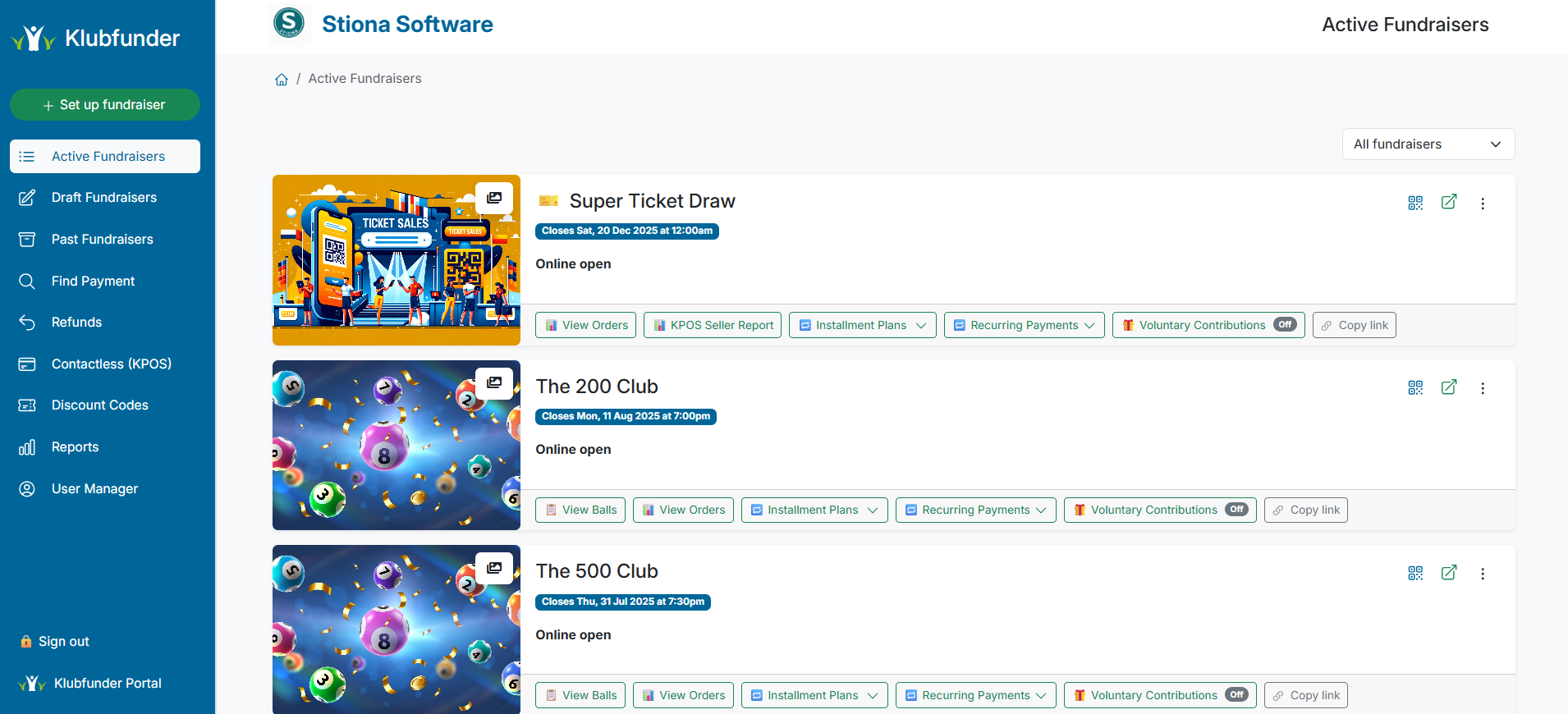
📂 Event Area Sidebar Overview
The Event Dashboard sidebar is organised into 10 key sections, giving you quick and easy access to all event and fundraiser management tools.
⚡ Set Up Fundraiser Actions (Quick Menu)
A quick-access drop-down menu for creating and managing fundraisers.
From here, you can:
- Create new fundraisers
- Set up Event Registration (first option)
- Access common setup actions quickly
🟢 Active Fundraisers
Displays all currently active fundraisers for your club.
From this section, admins can:
- Edit fundraiser details
- View orders and registrations
- Monitor live ticket sales
📝 Draft Fundraisers
Shows all fundraisers that are:
- Still being prepared
- Awaiting approval before going live
This allows admins to finalise setup before publishing.
🕘 Past Fundraisers
Provides a complete history of previous fundraisers run on your club’s account.
Use this area to review:
- Past performance
- Registration data
- Completed campaigns
🔍 Find Payment
Allows admins to quickly locate completed payments by:
- Customer email address
- Order ID
Ideal for handling queries or resolving payment issues.
↩️ Refunds
View all refunded orders associated with events and fundraisers.
This section displays:
- Refund amounts
- Order details
- Refund status
📱 Contactless (KPOS)
Configure and manage KPOS contactless payment settings.
This area is used for:
- In-person ticket sales
- Event-day payments
- Contactless fundraising
🏷️ Discount Codes
Create and manage discount codes for specific events or fundraisers.
Discount codes can be distributed to:
- Members
- Volunteers
- Promotional groups
📊 Reports
Access reporting tools related to events and fundraisers, including:
- Service Sales Breakdown
- Custom reports created for your club
These reports are useful for financial tracking and committee review.
👥 User Manager
Manage user access for Tap to Pay and Contactless KPOS features.
Use this section to assign appropriate roles to club members and volunteers.
✅ Summary
The Event Dashboard gives clubs full control over events, ticketing, and fundraising, making it easy to manage registrations, payments, and reporting from a single interface.