
Appearance
How to Set Up a Sponsorship Campaign
A Sponsorship Campaign allows supporters to donate towards a specific individual, team, or cause within your club.
This gives donors greater transparency and control over where their contributions go, helping to increase engagement and overall fundraising success.
This guide will walk you through how to:
- Create a Sponsorship Campaign
- Set donation goals and presets
- Add individual sponsees (sponsors)
- Publish the campaign for supporters to contribute
💡 Why Use Sponsorship Campaigns?
Sponsorship campaigns are ideal for:
- Supporting individual players or members
- Funding specific projects (e.g. facilities, equipment)
- Allowing donors to choose who or what they support
This creates a more personal and engaging fundraising experience.
🧭 Navigate to Sponsorship Campaign Setup
To begin:
- Log in to your Club Admin Dashboard
- Navigate to Set Up Fundraiser
- Select Sponsorship Campaign
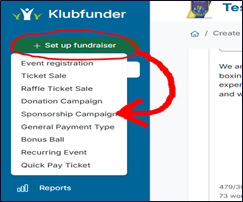
➕ Create a New Campaign
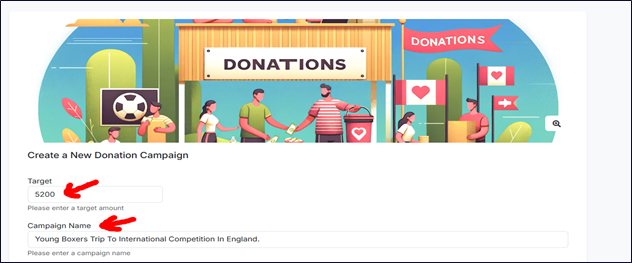
Campaign Name & Goal
Enter the main details of your campaign:
- Campaign Name – e.g. Player Sponsorship 2026
- Goal Amount – Total amount you aim to raise
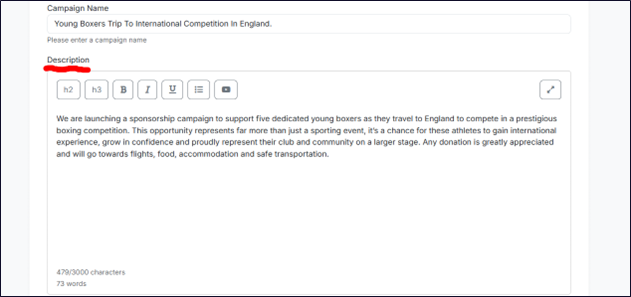
Description
Provide a clear description explaining:
- What the campaign is for
- Who or what is being supported
- How the funds will be used
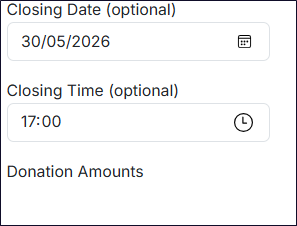
Closing Date & Donation Options
- Set the closing date and time for the campaign
- Configure donation amount presets (optional fixed amounts for quick selection)
Once all details are entered:
- Click Review
📄 Review Campaign Details
You will now see a summary of all campaign information.
Carefully check:
- Campaign name
- Goal amount
- Description
- Donation options
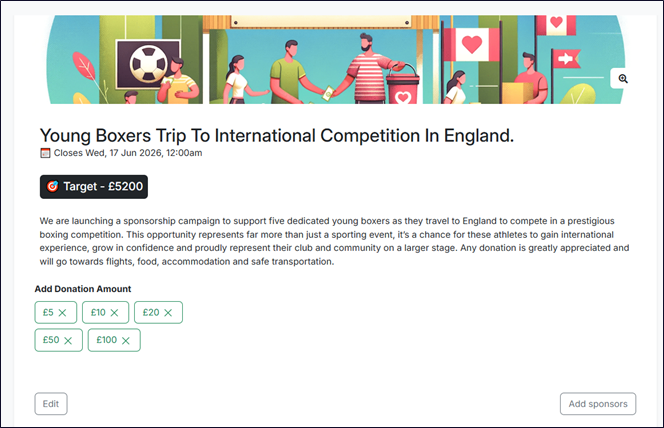
👤 Add Sponsees (Sponsors)
Once reviewed, you can begin adding individuals or entities to sponsor.
- Click Add Sponsors
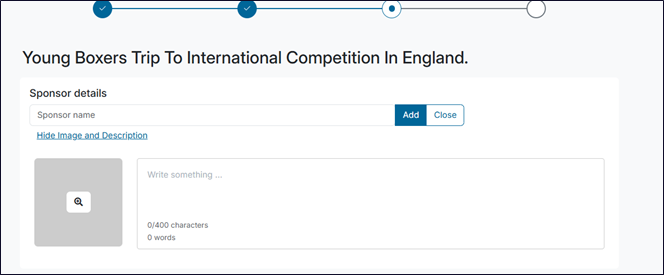
Add Sponsor Details
For each sponsor, enter:
- Name
- Description (optional)
- Photo/Image (optional)
This allows donors to clearly see who they are supporting.
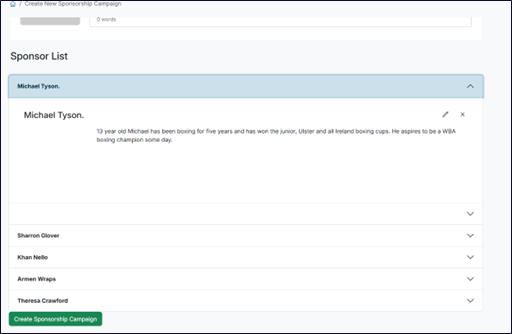
As you add sponsors, they will appear in a list below, allowing you to review all entries.
🚀 Create the Sponsorship Campaign
Once all sponsors have been added and reviewed:
- Click Create Sponsorship Campaign
Your campaign will now be live and available to supporters.
👀 Viewing & Donating
Once published, users will be able to:
- View campaign details
- Select a specific sponsor (sponsee)
- Choose a donation amount
- Complete checkout
💳 Making a Donation
Supporters can:
- Choose who they want to sponsor
- Select or enter a donation amount
- Complete the payment process
Each donation will be allocated directly to the selected sponsor or campaign.
✅ Summary
You have now successfully:
- Created a Sponsorship Campaign
- Set a fundraising goal and donation options
- Added individual sponsors for targeted support
- Published a campaign for your community to engage with
This feature helps create a more personal and transparent fundraising experience for your club.