
Appearance
🎟️ Lotto Dashboard
The Lotto Dashboard is the central hub for managing your club’s lotto on Klubfunder.
After logging in as a Club Admin, click Lotto – Manage from the Admin Dashboard to access this screen. From here, you can manage ticket sales, oversee draws, configure lotto settings, and enter draw results — all in one place.
📌 Important: This is also where draw results are entered after each completed draw.
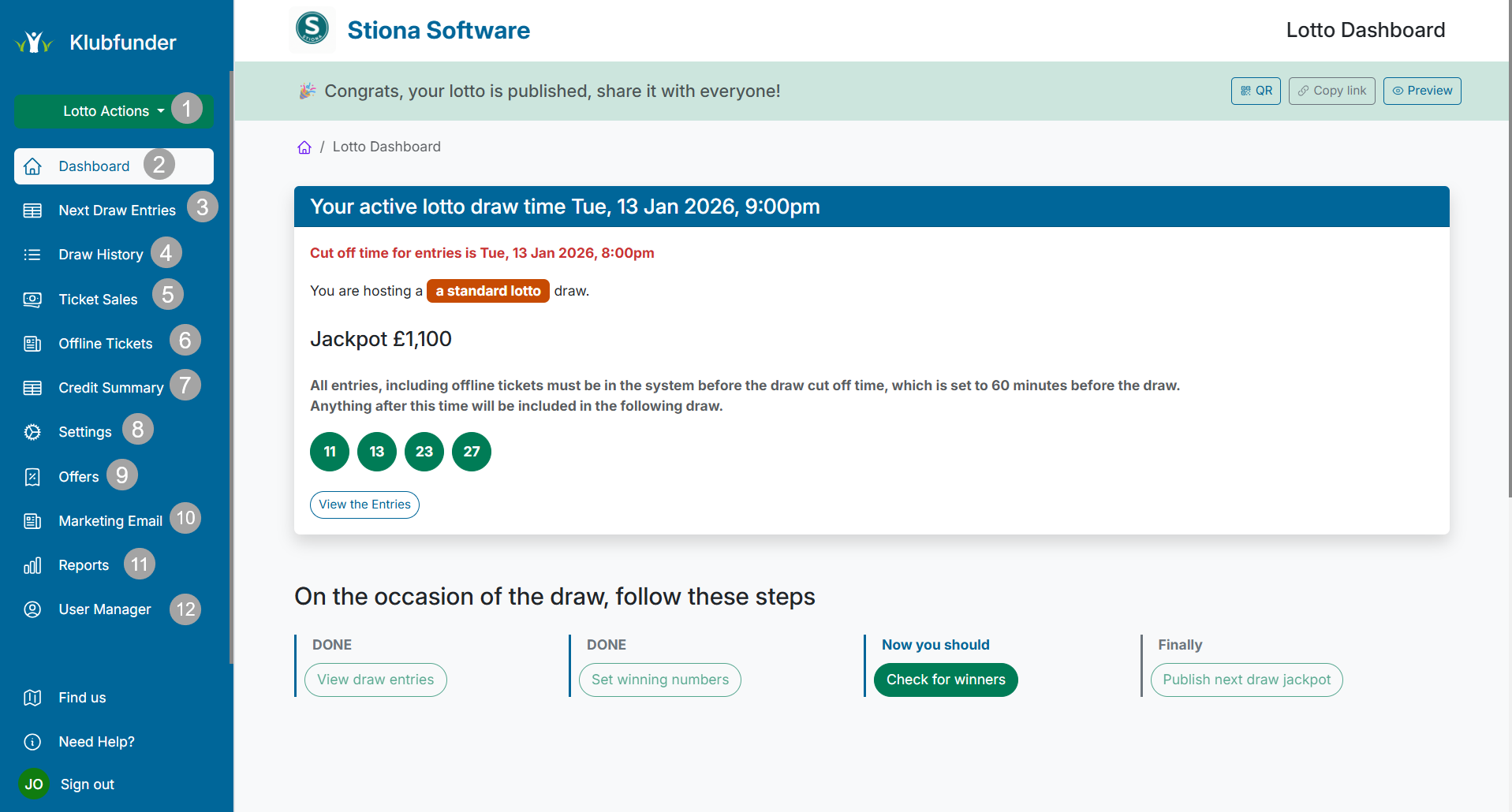
📂 Lotto Sidebar Overview
The Lotto Dashboard sidebar is organised into 12 key sections, giving you quick and easy access to every lotto feature and management tool.
⚡ 1. Lotto Actions (Quick Menu)
A quick-access drop-down menu designed for common admin tasks, including:
- ➕ Add Offline Tickets
- 🖼️ Change the Lotto Image Banner
- 💳 Update Lotto Payment Options
This menu allows you to make fast changes without navigating away from the dashboard.
🏠 2. Dashboard
Returns you to the main Club Admin Dashboard.
Use this option when switching between different Klubfunder services.
🎯 3. Next Draw Entries
Displays all players and ticket lines entered into the next upcoming draw.
This provides a clear overview of who is included before the draw takes place.
🕘 4. Draw History
View a complete history of all lotto draws completed on Klubfunder V2, including:
- Draw dates
- Winning numbers
- Historical results
Ideal for reviewing past draws or responding to member queries.
🎟️ 5. Ticket Sales
Provides a detailed breakdown of all lotto ticket purchases, including:
- Individual ticket lines
- Customer purchase history
- A summary of ticket sales from the last month
This section is useful for tracking engagement and overall performance.
🧾 6. Offline Tickets
Used to manually add offline ticket entries sold outside the online system.
Offline tickets can be entered for:
- The next draw
- Future scheduled draws
💰 7. Credit Summary
Displays a snapshot of lotto credit activity, including:
- Members with low credit
- Members who have dropped off
- Tickets with available credit remaining
This helps admins identify members who may need reminders or follow-ups.
⚙️ 8. Settings
The main configuration area for your club’s lotto.
Here you can manage:
- General lotto setup
- Draw rules and behaviour
- Payment and renewal options
- Advanced configuration settings
🎁 9. Offers
Create and manage Lotto Offers to encourage participation, such as:
- 3 lotto lines for £5
- Promotional bundles or discounts
Offers are a great way to boost ticket sales and player engagement.
📧 10. Marketing Email
Create and send marketing emails to:
- Current lotto players
- Previous lotto customers
Use this section to promote offers, announce draws, or re-engage inactive members.
📊 11. Reports
Access detailed lotto reporting, including:
- Service Sales Breakdown
- Auto-Renew Tickets Summary
- Financial and performance insights
Perfect for committee reviews and financial oversight.
👥 12. User Manager
Manage lotto-specific user roles, including access for:
- KPOS systems
- Tap-to-Pay functionality
This ensures the correct users have appropriate access levels.
✅ Summary
The Lotto Dashboard provides everything needed to run, manage, and grow your club’s lotto efficiently — from ticket sales and draw management to marketing and reporting.
🎟️ What Is the Lotto Area?
The Lotto area on Klubfunder is your all-in-one solution for running weekly/monthly digital lotto draws.
It's designed to help clubs, schools, and community organisations raise money online, with minimal admin effort and maximum reach.
Whether you're starting from scratch or moving from a paper-based draw, Klubfunder gives you a modern, flexible, and automated way to fundraise through lotto.
✅ Key Features
With the Lotto tool, you can:
- 🛒 Sell lotto entries online – Simple and secure payments via card
- 🗓️ Schedule automatic draws – Weekly or bi-weekly options
- 🔢 Customise number selection – Choose draw format (e.g. 4 numbers from 1–32)
- 📊 Track ticket sales in real-time – View purchases, export reports
- 🥇 Announce winners easily – Auto-publish results online & notify via email/SMS
- 💳 Secure Stripe payments – Money goes directly to your club’s Stripe account
- 📄 Upload lotto license – Stay compliant with local regulations
🎯 Why Use Klubfunder for Lotto?
💡 Fundraising is easier when it's online. Klubfunder helps clubs reach more supporters and boost ticket sales with less effort.
🔐 Secure & Trusted
Your lotto is powered by Stripe, one of the world’s most reliable online payment providers – fully PCI-compliant and safe.