Appearance
👥 Membership Dashboard
The Membership Dashboard is the central hub for managing your club’s memberships on Klubfunder.
After logging in as a Club Admin, click Membership – Manage from the Admin Dashboard to access this screen. From here, you can manage membership options, oversee registrations, issue member fees, and manage teams — all in one place.
📌 Note: This area controls both member registration and ongoing membership administration.
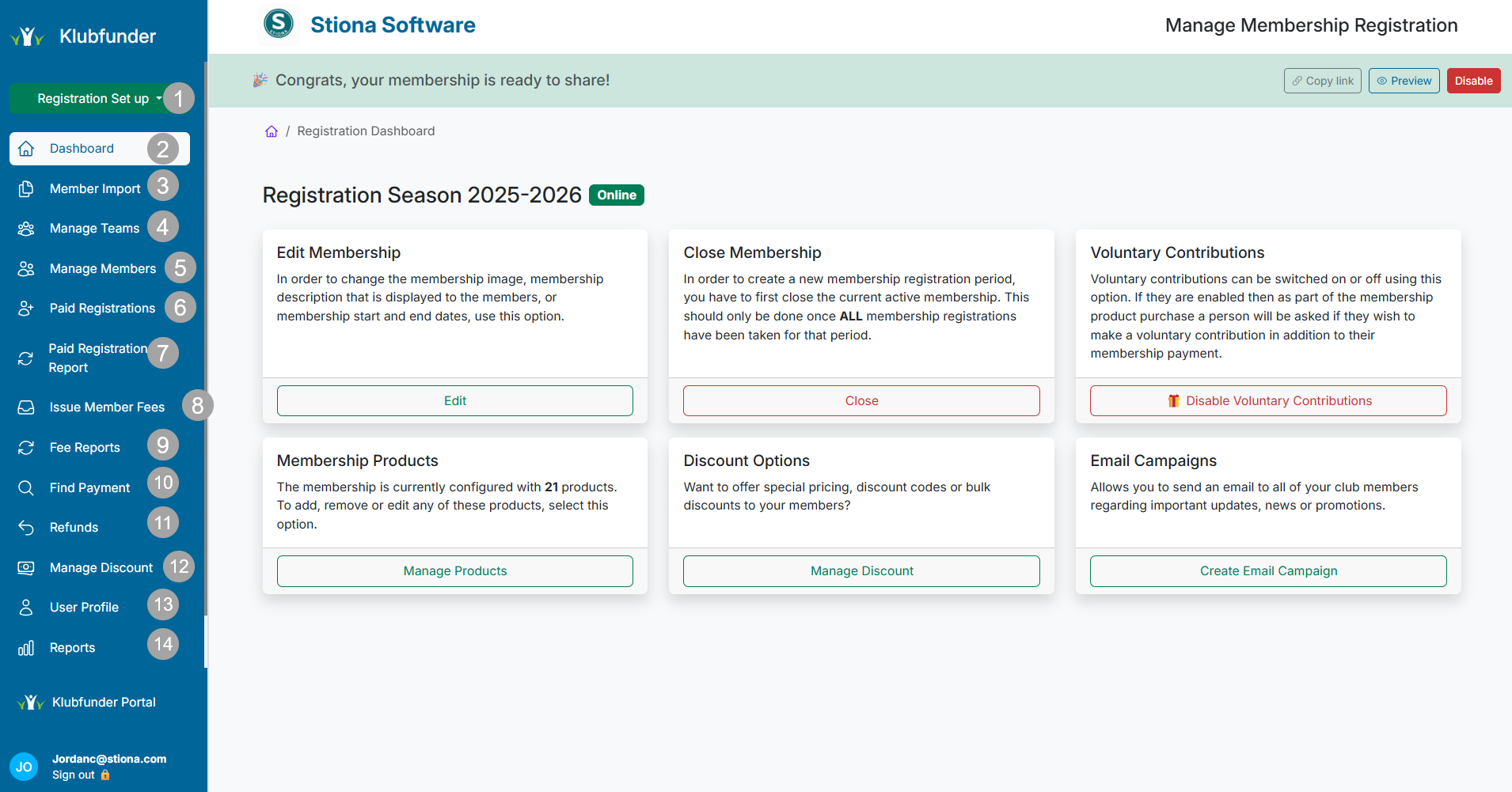
📂 Membership Sidebar Overview
The Membership Dashboard sidebar is organised into 15 key sections, giving you quick and easy access to all membership-related features and tools.
⚡ Membership Actions (Quick Menu)
A quick-access drop-down menu for common admin tasks, including:
- ➕ Add Membership Options
- 💳 Update Payment Options
- 📄 Manage Policy Documents
- 📝 Update Terms & Conditions
- 🖼️ Upload or change the Image Banner
This menu allows you to make updates quickly without leaving the dashboard.
🏠 Dashboard
Returns you to the main Club Membership Dashboard.
Use this when switching between different Klubfunder services.
📥 Member Import
🚧 Coming Soon
This feature will allow bulk importing of members into the system.
🧑🤝🧑 Manage Teams
Create and manage teams that can be selected during the membership registration process.
Members will be automatically assigned to their chosen team once registered.
🧍 Manage Members
View a complete list of all registered members, with the ability to:
- View member details
- Download member information
- Manage individual records
🧾 Paid Registrations
View all completed membership registration payments, including access to detailed payment information for each member.
💰 Paid Registration Report
Available only when instalment payments are enabled.
This report provides an overview of members who:
- Paid in full
- Completed registration via instalments
⚙️ Issue Member Fees
Used by clubs that issue additional member fees, such as:
- Training fees
- Trips or tours
- Fine payments
Fees can be issued by team and are sent directly to members via email.
🎁 Fee Reports
Similar to the Paid Registration Report, this section focuses on Member Fees, providing:
- A breakdown of payments
- Instalment tracking
- Completion status
🔍 Find Payment
Allows admins to quickly search for payments across the Membership system, making it easier to locate specific transactions.
↩️ Refunds
View all refund orders created within the Membership system, including:
- Refund amounts
- Payment details
- Refund status
🏷️ Manage Discounts
Create and manage discounts for membership options that support discounting.
You can:
- Set fixed or percentage-based discounts
- Create discount codes
- Automatically apply discounts to eligible memberships
📧 Marketing Email
Create and manage membership marketing email campaigns.
Emails can be sent to all members and are subject to weekly limits based on your club’s subscription plan.
📊 Reports
Access membership reporting tools, including:
- Service Sales Breakdown
- Custom reports created for your club
These reports are ideal for committee and financial reviews.
👤 User Manager
Assign roles to club members, such as the Coach role, allowing them to:
- View assigned teams
- Manage team information
Coach access is available through the Klubapp.
✅ Summary
The Membership Dashboard gives clubs full control over registrations, payments, teams, and communication, making it easy to manage memberships efficiently and professionally.